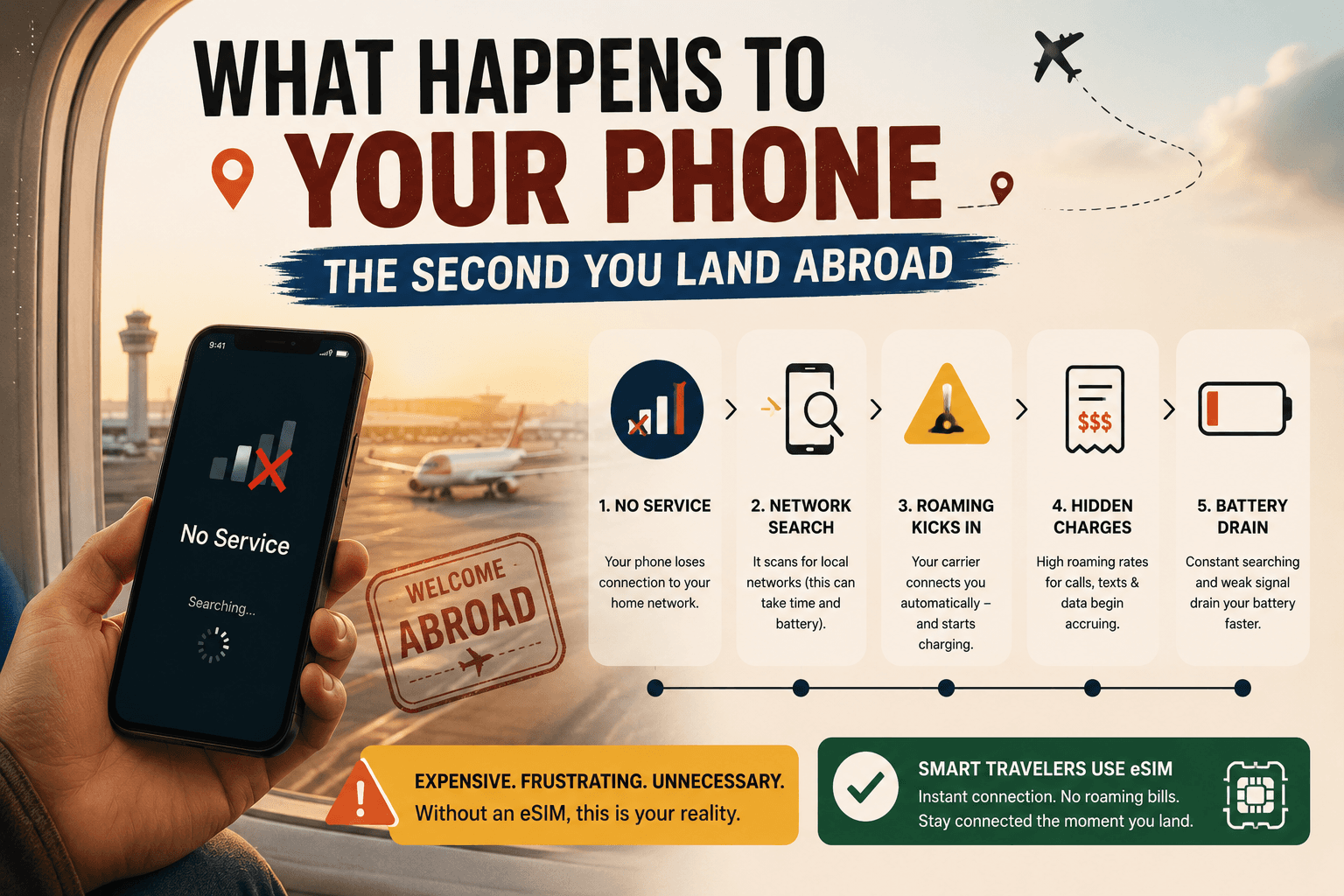
What Happens to Your Phone the Second You Land Abroad
What happens to your phone when you land abroad is more dramatic than most travelers expect — and more expensive. Before you flip off airplane mode at baggage claim, read this.
You land. The seatbelt sign goes off. Forty people around you instantly reach for their phones. You do the same. Airplane mode goes off. And in that exact moment — before you’ve collected your bag, before you’ve cleared customs, before you’ve even found the exit — your phone has already started making decisions that could cost you hundreds of dollars.
What happens to your phone when you land abroad isn’t complicated, but it is fast, automatic, and almost completely invisible. Your phone connects to a foreign network within seconds of getting a signal. If your carrier’s international roaming is active, the billing clock starts immediately. If you don’t have a travel eSIM already set up, that moment is already costing you.
This guide explains exactly what your phone does the second you land abroad, why roaming charges catch so many Canadian travelers off guard, and what you can do before your next flight to make sure it never happens to you.
The First 60 Seconds: What Your Phone Does Before You Even Move
Most travelers think of roaming as something that happens when they actively use their phone — open an app, make a call, load a map. The reality is different and more expensive.
The moment you disable airplane mode, your phone performs a digital handshake with a foreign tower. This process, known as international roaming, allows you to maintain a connection even when you are outside your home provider’s coverage area.</cite>
That handshake happens in seconds. And it doesn’t wait for you to open an app.
The silent data triggers you never see
Several hidden triggers can activate roaming charges without you ever opening an app. Background App Refresh causes apps like Maps, Mail, and Social Media to constantly sync data to provide real-time updates. Wi-Fi Assist automatically switches you to roaming data if the local Wi-Fi signal is weak. Visual Voicemail downloads audio files for voicemails in the background, consuming data instantly. Automatic Updates can trigger gigabytes of data usage while you sleep.</cite>
None of these require you to touch your phone. All of them generate data usage — and if international roaming is active on your home SIM, all of them generate roaming charges.
The overnight data problem
A single night with data roaming enabled can trigger 50–200MB of background usage. Depending on your carrier, that translates to CA$50–200 in charges while you’re unconscious.</cite>
This is one of the most common sources of roaming bill shock for Canadian travelers. The phone sits on the nightstand. Nobody touches it. The bill arrives three weeks later.
Why Roaming Charges Start Before You Even Reach Baggage Claim
Understanding how roaming works is the first step to not being surprised by it.
International roaming works through agreements between your home network and foreign networks. When you arrive abroad and turn off airplane mode, your phone sends a signal that is picked up by a local cell tower. The foreign network checks with your home carrier to see if your account allows international access. If approved, you are granted access. Your home carrier will then track your usage on this foreign network and bill you according to your contract rates.</cite>
For Canadian travelers on Rogers, Bell, or Telus, those contract rates mean a daily roaming charge of CA$16–18 per day — activated automatically, billed even for minimal use, and applied from the moment your phone first connects to a foreign tower.
The automatic activation trap
Most carrier international plans activate automatically when you use your device abroad, even briefly. Check one email or receive a text message, and you’re charged for the entire day. There is no partial-day billing — use your phone for five minutes or five hours, and the cost is identical.</cite>
Land at 11:45pm local time. Receive one welcome text from the foreign carrier. You’ve just paid CA$16–18 for 15 minutes of access.
What happens if you have no roaming plan at all
In 2024, travelers worldwide racked up over $60 billion in unexpected roaming charges. Most people who got hit with these bills didn’t even know data roaming was on — no warning message, no spending alert, just an email from their carrier weeks later with a four-figure charge.</cite>
If you don’t have a daily pass activated, <cite index=”12-1″>international roaming without a plan can cost over CA$20 per megabyte on pay-per-use rates — meaning a single video call could run hundreds of dollars.</cite>
The 5 Things Your Phone Does Automatically When You Land Abroad
Here is the exact sequence of what happens to your phone when you land abroad — most of it invisible, all of it billable if your home SIM’s roaming is active.
1. It connects to the strongest local tower
Within seconds of airplane mode going off, your phone scans for available networks and connects to the strongest signal. It doesn’t ask permission. It doesn’t warn you. It connects — and if that network is a roaming partner of your Canadian carrier, billing begins.
2. Your carrier sends you a “welcome” text
You’ll almost certainly receive a text from your home carrier within minutes of landing: “Welcome to [country]. Roaming rates apply.” This text itself is not a charge. But the data connection that received it is now active and billable.
3. Background apps begin syncing
Email refreshes. iCloud or Google Photos begins uploading your last camera roll. WhatsApp downloads messages and media. Weather updates. Maps refreshes your location. <cite index=”27-1″>Even receiving a welcome SMS from a local provider can occasionally trigger a daily fee if your phone responds with a delivery receipt.</cite> All of this happens before you’ve picked up your bag.
4. Your apps request location access
Navigation apps, ride-hailing apps, hotel apps — all of them ping your location when they detect you’ve moved. That location ping requires a data connection. On a home SIM with roaming active, it costs money. On a SimClaire travel eSIM, it’s included in your plan.
5. Automatic updates queue up
Your phone detects it’s been in airplane mode for hours and queues every pending app and system update for immediate download. On home Wi-Fi, those updates are free. On a roaming connection, <cite index=”30-1″>a single night of background data can trigger 50–200MB of usage</cite> — and your carrier bills per megabyte or per day, not per choice.
iPhone vs Android: Does It Matter What Phone You Have?
The short answer is no — both platforms have roaming on by default, and both will connect to foreign networks automatically. But the settings to manage it differ.
On iPhone
Go to Settings → Mobile Data → Mobile Data Options → Data Roaming. Toggle it off to prevent your home SIM from roaming. You can also go to Settings → General → Background App Refresh and disable it entirely while traveling.
For eSIM-compatible iPhones (iPhone XS and later), you can install your SimClaire eSIM as a separate line and set it as your default data line — leaving your Rogers, Bell, or Telus SIM active for calls and texts but preventing it from roaming.
On Android
Go to Settings → Connections → Mobile Networks → Data Roaming and toggle it off. On Samsung devices specifically: Settings → Connections → Data Usage → Data Saver adds an additional layer of background data control.
Android’s dual-SIM management also makes eSIM setup straightforward — you can assign data to your SimClaire eSIM and calls/texts to your home SIM simultaneously.
How a Travel eSIM Changes What Happens When You Land
This is where the experience of landing abroad changes completely.
If you’ve set up a SimClaire travel eSIM before your flight, what happens to your phone when you land abroad looks entirely different. Instead of your home SIM scrambling to connect to a foreign roaming partner at CA$16–18/day, your eSIM connects directly to a local network as a local subscriber.
Your home SIM stays active in the background, so you can still receive SMS messages — useful for two-factor authentication — and incoming calls, though answering those calls may incur roaming charges.</cite>
What this means in practice:
- Your eSIM data line connects to the local 4G or 5G network automatically
- Background apps sync over the eSIM, not your home SIM
- Your Canadian number stays reachable for calls and texts
- No roaming clock is running on your home carrier account
- No surprise daily charge for the 15 minutes between landing and reaching your hotel
The cost difference between roaming and a travel eSIM is significant. A 10-day Europe trip on Rogers Roam Like Home costs CA$160. A 10-day SimClaire Europe eSIM plan costs a fraction of that — with no automatic activation trap and no per-day billing.
The Pre-Landing Checklist: What to Do Before You Fly
The best time to sort your phone connectivity is before you board, not after you land. Here is exactly what to do.
48 hours before your flight:
- Check if your phone is eSIM compatible
- Purchase your SimClaire eSIM plan for your destination
- Install the eSIM via QR code on home Wi-Fi
The night before:
- Turn off Data Roaming on your home SIM (Settings → Mobile Data)
- Turn off Background App Refresh
- Download offline Google Maps for your destination
- Save hotel address, booking confirmations, and transit info offline
At the gate:
- Switch to airplane mode for the flight
- Double-check your eSIM is installed and showing in your SIM settings
The moment you land:
- Turn off airplane mode
- Your SimClaire eSIM connects automatically — no setup required at the airport
- Your home SIM stays active for calls and texts, roaming data is off
- You walk through arrivals connected, with no roaming clock running
What Happens to Your Phone in Specific Countries
The roaming experience isn’t identical in every destination. Some countries have additional rules that affect what your phone does when you land.
Indonesia and Kenya require IMEI registration at the airport to avoid permanent signal loss. Russia enforces a mandatory 24-hour blackout on data and SMS for all foreign SIMs. Turkey blocks foreign devices after 120 days unless a registration fee of approximately $1,260 is paid.</cite>
For most popular Canadian travel destinations — Europe, the USA, Southeast Asia, the Caribbean — none of these extreme rules apply. But it’s worth checking your specific destination’s mobile rules before you fly, particularly for less-common routes.
For Europe, SimClaire’s best eSIM for Europe covers 34 countries under one plan — including Switzerland and the UK, which many competitors quietly exclude.
For the USA, a SimClaire US eSIM connects to local networks directly, bypassing Canadian carrier roaming rates entirely. Particularly relevant for snowbirds and extended-stay travelers where monthly roaming costs would otherwise compound dramatically.
Frequently Asked Questions
Does my phone automatically roam when I land abroad?
Yes. The moment you turn off airplane mode, your phone connects to the strongest available network. If your home carrier has a roaming agreement with a local network in that country, roaming begins automatically — even before you open any app.
How do I stop my phone from roaming when I land abroad?
Go to Settings → Mobile Data → Mobile Data Options and turn off Data Roaming before your flight. This prevents your home SIM from connecting to foreign networks. You can then use a travel eSIM for data without triggering home carrier charges.
What is the cheapest way to use my phone abroad?
A travel eSIM purchased before you fly is consistently the cheapest option for Canadian travelers. SimClaire’s plans cover 150+ destinations and cost significantly less than Rogers, Bell, or Telus daily roaming rates — with no automatic activation trap and no bill shock on return.
Can I keep my Canadian number while using a travel eSIM?
Yes. On dual-SIM devices, your home SIM stays active for calls and texts while the eSIM handles data. You receive calls and texts on your regular Canadian number, and your data runs through the local eSIM network at local rates.
Do I need internet to install a travel eSIM?
You need a Wi-Fi connection to scan the QR code and install the eSIM. This is why SimClaire recommends installing your eSIM before you leave home — not at the airport, and certainly not after you’ve already landed abroad.
The Bottom Line
What happens to your phone when you land abroad is automatic, fast, and expensive if you’re not prepared. Your phone connects to a foreign tower within seconds. Background apps start syncing within minutes. If your home SIM’s roaming is active, the billing clock started before you reached baggage claim.
The fix is straightforward: set up a SimClaire travel eSIM before you fly, turn off data roaming on your home SIM, and land knowing exactly what your connectivity will cost — because it’s already paid for.
Building your bridge to the world — before you even land. 🧡
Ready to land connected without the roaming bill? Browse SimClaire’s eSIM plans at simclaire.com or reach us on WhatsApp at +1 437-605-6560.